CrimeRadar: Dispatch Alerts
- 4.8
- Rating
- 1.00M
- Installs
- Free
- Price

 Analysis by App-foxy
I approached CrimeRadar as a practical news and safety app rather than something to open for entertainment. Its purpose is to help me keep an eye on nearby activity through a safety map and alerts connected to live first-responder radio. That combination gives the app a more immediate feel than a normal local-news feed, but it also means I have to interpret information carefully instead of treating every alert as a complete explanation.
CrimeRadar is made by Scoopz LLC and is available free of charge in the News & Magazines category. It is rated for Everyone, works on Android 8.0 and later, and the current release is version 25.51.0. The app has already passed the half-million-install mark, with an average score of 4.8 from roughly 6,300 ratings and about 1,200 written reviews. Those figures suggest that the idea is connecting with a substantial audience, although popularity alone does not tell me whether it will fit every person’s needs.
How CrimeRadar handles readability and navigation
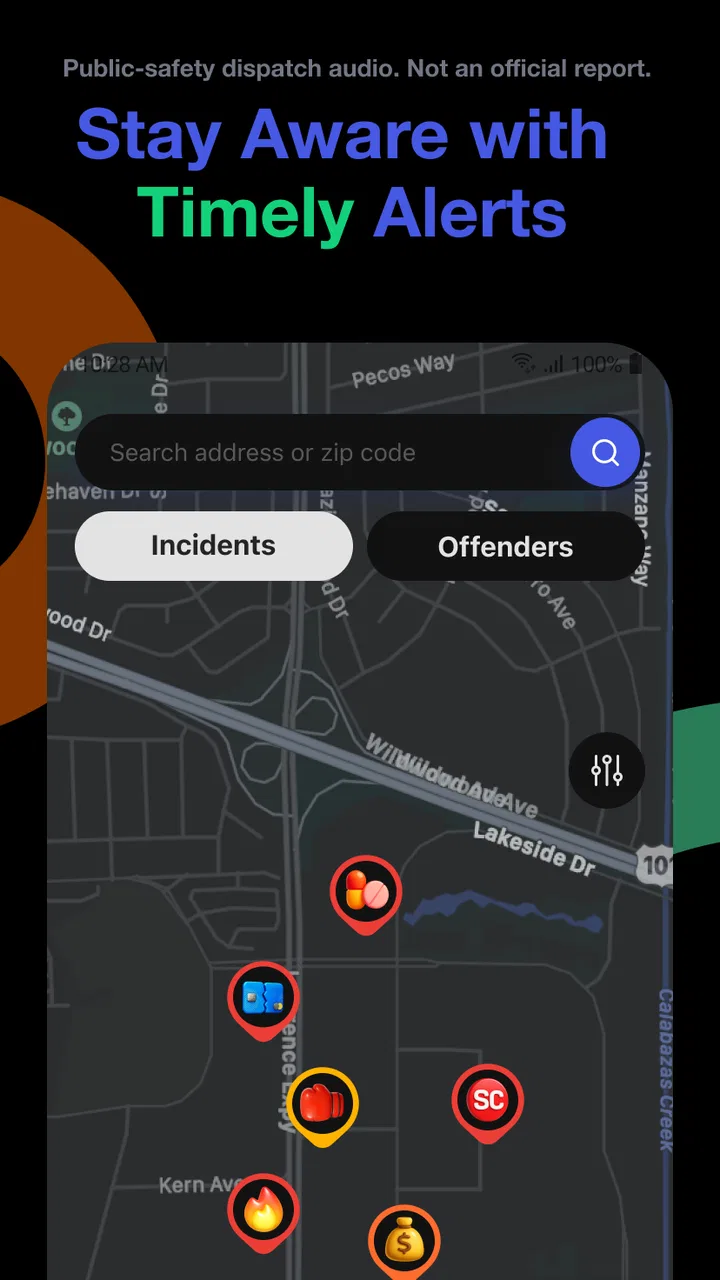
The central appeal is easy to understand: I can look at a map to get a sense of what is happening around me, then use alerts to stay aware without constantly searching through separate local sources. That is a more direct starting point than opening a general newspaper app and moving through unrelated headlines. For someone who wants a quick awareness check before leaving home, the map-first approach makes more sense than a long scrolling list.
You May Also Like

 Blood Strike: 2.5 Anniversary
Blood Strike’s Loadouts Turn Every Drop Into a Tactical Gamble
A close look at Blood Strike’s custom loadouts: how fast access to signature weapons reshapes its battle royale rhythm, rewards preparation, and narrows the gap between fights.

 Pandora - Music & Podcasts
Pandora’s Music Is Easy to Start, but Harder to Recover
Pandora’s strength is its low-effort path from a seed to a station. Its weak spot is how much confidence it asks you to place in connection, setup, and quiet recovery.

 8 Ball Pool
 Is Built on Rivalries, Rematches, and Routine
A close look at the rivalries, rematches, shared routines, and unanswered safety questions that turn a quick pool match into a persistent mobile community.

 Samsung Music
’s Quiet Strength Is Playing What You Already Own
Its reach comes less from spectacle than from dependable access to a personal library. That simplicity is both the app’s strongest retention engine and its ceiling.

 AccuWeather: Weather Radar
AccuWeather Review: A Quick, Clear Forecast for Everyday Decisions
For everyday plans, the best forecast is the one you can understand quickly. AccuWeather makes rain timing, radar, and local conditions easy to act on, with a few trade-offs.

 Hill Climb Racing
Why Hill Climb Racing Still Turns Crashes Into One More Run
A tiny car, a bumpy hill and one more upgrade: Hill Climb Racing keeps resurfacing because its simple chaos makes every near-miss feel personal.
More From Our News Desk



Still, a map is not automatically easy for everyone to read. Maps ask me to understand position, distance, symbols, and changing items at the same time. When several incidents appear close together, the visual picture can become harder to interpret, particularly on a smaller phone screen. I find the app most useful when I pause over an item and consider its location and context, rather than making a judgment from a cluster of markers alone.
The radio-based element also changes how I navigate the information. A first-responder transmission can be timely, but spoken updates are not the same as a carefully edited article. They may be brief, fragmented, or dependent on local knowledge. I would therefore use the map to orient myself and the alerts to prompt further attention, not as a replacement for a clearly written news report.
For readers who prefer large, calm, highly structured text, this distinction matters. A traditional local-news app usually gives me headlines, paragraphs, and a familiar reading order. CrimeRadar is better suited to checking an area and noticing activity as it develops. It is less naturally suited to sitting down and reading a complete account from beginning to end.
What makes the interface useful in a quick check
My preferred workflow is deliberately short. I open the app, look at the area that matters to me, identify whether an item is close to my route, and then decide whether I need another source before acting. This keeps the map from becoming an endless browsing exercise. It also reduces the chance that I will confuse an older concern with something relevant to the present moment.
A useful habit is to separate three questions: where is the activity, what kind of situation does the alert suggest, and what action is actually reasonable? The app can help with the first two, but the third remains my responsibility. That is an important usability point because a fast alert can feel more certain than it really is.
Compared with a social-media feed, CrimeRadar has a clearer geographic purpose. Social platforms may offer more commentary, photographs, and follow-up discussion, but they can also bury local information under unrelated posts. Compared with a standard news app, CrimeRadar feels more immediate and location-focused, while a conventional publication is often better for background and confirmation.
Reading demands and personal interpretation
The app’s usefulness depends on my ability to distinguish an alert from a verified narrative. Live first-responder radio is a stream of operational communication, not a finished article written for general readers. That creates a reading and listening burden even when the visual controls themselves feel straightforward. I need to allow for incomplete information, changing circumstances, and language that may not explain the full situation.
This is where I think the app is strongest for people who already have a sensible news routine. I can use it as an early signal, then check a trusted local source when the matter is important. Someone who wants one polished explanation with all the relevant context may be happier with a newspaper or broadcaster’s application.
Motor, sensory, and situational considerations
CrimeRadar can be useful for people who do not want to type a detailed search every time they check local conditions. A map and alert approach may reduce the need for repeated text entry, which is helpful when I am in a hurry or when typing on a phone is uncomfortable. At the same time, map interaction can involve tapping small areas, moving around a screen, and selecting individual items. That may be tiring for users with limited dexterity or reduced precision.
I would not assume that every control is equally comfortable for every hand. When I am walking, carrying something, or using the phone one-handed, a detailed map can demand more accuracy than a simple article list. My practical advice is to check the app before entering a busy situation, rather than trying to study several markers while moving through traffic or a crowded public place.
Sensory context matters just as much. The radio connection is valuable for people who can listen comfortably, but audio is not a universal solution. A person who is deaf or hard of hearing may need to rely primarily on the visual information available in the app. Likewise, someone in a loud environment may miss spoken details, while someone in a quiet shared space may not want audio playing aloud.
That makes the map especially important, but it also means I would not treat the experience as equally complete for every sensory preference. If the most useful detail is conveyed through live audio, a reader who cannot access that audio may receive a thinner picture. The app can still offer situational awareness through its visual side, but the balance between map information and radio information is worth considering before depending on it.
For people who are sensitive to alarming content, the speed of safety alerts may also be a concern. The app is designed around awareness of incidents, so frequent checking could increase anxiety rather than reduce it. I think it works better with a clear purpose, such as checking a commute or monitoring a neighborhood, than as a background source of constant worry.
Using it without losing attention to the real world
A realistic example is a person preparing to pick up a child after work. Before leaving, I can check the nearby area for activity and decide whether a normal route still feels sensible. If an alert appears, I can stop and verify it through a local news source or official communication before changing plans. I would not keep staring at the phone while driving, cycling, or crossing a street; the app is most helpful before movement begins and after I have reached a safe place.
The same principle applies to commuters, students, delivery workers, and people returning home late. The value is not in watching the map continuously. It is in using the information at a few deliberate points: before departure, when a notification changes the situation, and after arriving somewhere secure. That workflow is more accessible because it limits the amount of visual and mental effort required at once.
For older users or anyone less comfortable with maps, I recommend starting with one familiar area instead of exploring an entire city. A known neighborhood gives the markers meaning and makes it easier to judge distance. Trying to interpret an unfamiliar map full of activity can be confusing, especially when the app is being used under stress.
Where the app still creates barriers
The biggest barrier is interpretation, not simply navigation. A live radio-based alert may tell me that responders are dealing with something, but it may not tell me whether I am personally at risk, whether the event is resolved, or whether the initial information will change. That uncertainty can affect anyone, but it is especially important for users who need precise, calm instructions before making a decision.
Another limitation is that a safety map can encourage false confidence. If I do not see an alert near me, I might mistakenly assume that everything is fine. If I see one, I might assume that the entire surrounding area is unsafe. Neither conclusion follows automatically. The map is a useful awareness layer, not a guarantee of complete coverage or a substitute for ordinary caution.
People who need detailed accessibility controls should evaluate the app in their own routine rather than relying on its general Everyone rating. An age rating tells me who the content is intended for; it does not promise that every visual, audio, or motor interaction will work equally well for every user. I would test the map, alert presentation, and radio-related information with the phone settings and assistive tools I normally use.
There is also a privacy-of-attention issue. Even when an app is technically easy to open, repeated alerts can interrupt work, rest, or conversations. I would be selective about when I check it and avoid allowing safety information to become a constant stream. For a person who wants quiet, comprehensive reporting, a local publication may be a better main source, with CrimeRadar used only as a secondary check.
Who should use it, and who should choose another option
I see the strongest fit for people who want geographically focused awareness and are comfortable combining quick alerts with their own judgment. It is particularly practical for checking a route, watching a familiar neighborhood, or noticing that something nearby deserves a closer look. The free price also makes it easy to try without committing to a subscription.
I would be more cautious about recommending it as the only source of safety information. If I need confirmed details, official instructions, legal context, or a complete account of an incident, I would turn to the relevant authority or an established local-news outlet. CrimeRadar is faster and more situational than those alternatives, but speed does not automatically provide completeness.
It may also be a poor match for someone who dislikes maps, finds live incident information stressful, or depends entirely on written explanations. A conventional news app can be easier to read at length, while official alert channels may be more appropriate when an emergency requires direct instructions. The best choice depends on whether the user wants an early signal, a finished story, or an authoritative directive.
One of the app’s less obvious strengths is that it can help me decide when not to investigate further. If I notice activity near a route, I do not need to approach the location or search for dramatic details. I can simply choose a different path, delay the trip, or confirm the situation from a distance. Used this way, the app supports restraint rather than curiosity.
My inclusive verdict after using CrimeRadar
CrimeRadar has a clear role: it brings a safety map and live first-responder radio into one place so I can form a quick picture of local activity. I like that it is more focused than a general news feed and less dependent on manually searching for every nearby event. Its free availability, Everyone content rating, and support for Android 8.0 and newer make it approachable for a broad range of phone users.
Its inclusive value is more nuanced. The map can reduce typing and make location the starting point, but it may demand visual attention, precise tapping, and comfort with spatial information. The radio connection can add immediacy, yet audio does not serve every user or every environment equally. The app is therefore most effective when I treat its visual and audio elements as complementary rather than assuming one format works for everyone.
My recommendation is to build a simple personal routine around it. Check before leaving, use the map to understand proximity, treat radio information as an initial signal, and confirm important developments through a reliable local or official source. Keep the phone away while driving or walking through hazards, and do not let an absent marker create a false sense of security.
After reaching the half-million-install milestone and earning a 4.8 average, the app clearly has an audience that values this style of awareness. My own conclusion is positive but measured: CrimeRadar is a useful secondary safety tool, not a complete replacement for local reporting or emergency instructions. If I want fast geographic context and can comfortably interpret changing information, it is worth trying. If I need fully explained stories, direct official guidance, or an experience built around one accessible format, another source should remain part of my setup.
FAQs for CrimeRadar: Dispatch Alerts
01What is CrimeRadar and how does it work?
CrimeRadar is a mobile application designed to keep users informed about crime rates and incidents in their vicinity. Using real-time data and advanced algorithms, the app provides detailed maps highlighting crime hotspots and recent activities. It alerts users to potential dangers, helping them make informed decisions about their safety.
02Is CrimeRadar available for both Android and iOS devices?
Yes, CrimeRadar is available for download on both Android and iOS platforms. Users can find it on the Google Play Store and the Apple App Store. It’s designed to be compatible with most devices, ensuring a wide range of users can access its features regardless of their operating system.
03Does CrimeRadar require an internet connection to function?
Yes, CrimeRadar requires an internet connection to access real-time crime data and updates. This connectivity allows the app to fetch the latest information from its databases, ensuring users receive accurate and up-to-date alerts about their surroundings and any potential threats.
04How accurate is the crime data provided by CrimeRadar?
CrimeRadar uses data from reliable sources, including law enforcement agencies and community reports, to ensure accuracy. While no system can guarantee 100% accuracy, CrimeRadar employs sophisticated algorithms to analyze trends and patterns, providing users with a credible overview of local crime activities.
05Can I customize the alerts and notifications on CrimeRadar?
Yes, CrimeRadar allows users to customize their alerts and notifications based on their preferences. Users can set specific parameters such as the type of crimes they wish to be alerted about, the frequency of updates, and the geographical radius for notifications, ensuring a personalized experience.
Pros
- Detailed crime maps enhance user awareness.
- Real-time updates keep information current.
- Customizable alerts for specific areas.
- User-friendly interface for easy navigation.
- Available in multiple languages for accessibility.
Cons
- Requires a constant internet connection.
- Limited features in free version.
- Some data may be outdated or inaccurate.
- Notifications can be overwhelming at times.
- Location services drain battery quickly.

CrimeRadar: Dispatch Alerts
Gallery